UX Case Study

QLess

A food pre-ordering application that lets you schedule your meal, pay in advance, and collect with a single OTP zero waiting, zero friction.

Role
UX / UI Design
Platform
Android Mobile App
Duration
6 Weeks
Year
2025
01 — Overview
What is QLess?
The Mission

QLess is a dedicated mobile pre-ordering app for a single food shop. It lets busy customers schedule their order for a specific pickup time, pay in advance, and receive a unique OTP. When they arrive, they say the OTP at the counter and walk out with food in hand no queue, no fumbling, no wasted time.

The app is not a marketplace like Swiggy or Zomato. It is built exclusively for one shop, enabling deep integration, zero commission, and a seamless experience for the shop's loyal customers.

The Challenge

Modern life is fast. People skip meals or make poor food choices not because they lack appetite but because they can't afford the time cost of a queue. The challenge was designing an experience so fast and frictionless that scheduling a meal becomes easier than skipping it.

My Role

End-to-end UX and UI design from user interviews and research through wireframing, prototyping, and final high-fidelity screens across all 10 app states.

Figma  ·  FigJam  ·  Google Forms  ·  Maze
1
OTP to collect your meal no card, no queue
10
Screens designed end-to-end for the full user journey
<30s
Target time from app open to completed order

02 — Problem Statement
"How might we let busy people pre-order food for a specific time, pay in advance, and collect it instantly without waiting in a single queue?"
Every minute in a food queue is a minute stolen from someone's day. We set out to solve this not with delivery but with intelligent scheduling.
12–18
Average minutes lost per person per food queue visit
63%
People who skip meals due to time pressure during weekdays
<30s
Target time from app open to order placed our core benchmark
03 — Research
Understanding the user

I conducted mixed-methods research: 10 in-depth interviews with working professionals, students, and commuters, a survey of 60 respondents, and a competitive analysis of existing ordering apps to identify what was missing.

🎤
In-depth interviews
10 semi-structured interviews with users aged 18–42 across students, office workers, and daily commuters. Key themes: frustration with unpredictable wait times, anxiety about being late, desire for a guaranteed ETA.
📋
Survey research
60 respondents across Puducherry and Chennai. Age range 18–50. Questions on meal-skipping frequency, willingness to prepay, and preferred notification style. 71% had never pre-ordered food from a local shop before.
🔍
Competitive analysis
No single-shop app combined time-slot scheduling + prepayment + OTP pickup in a clean, stress-free UI. Swiggy/Zomato add delivery overhead. WhatsApp orders have no payment integration or scheduling.
Survey findings — What users want most
Pre-schedule pickup time
88%
Pay in advance (no cash at counter)
81%
Real-time slot availability
76%
Simple OTP-based pickup
73%
Order history and reorder
58%
Push notification reminders
44%

04 — User Personas
Who we're designing for

Two primary personas emerged from the research, representing the spectrum of QLess users.

🎓
Karthik Selvam
College student · Daily commuter  ·  Age 21
Tech-savvy
Budget-conscious
Time-poor
Social media user
Goals
Eat a proper meal without being late to class
Know exactly when food will be ready
Pay digitally, no cash fumbling
Pain points
Queues at the canteen during peak hours are 15–20 min
Food is often cold or sold out when he arrives late
No way to plan ahead from existing apps
💼
Anitha Krishnan
Working professional · Office manager  ·  Age 34
Routine-driven
Efficiency-first
Loyal regular
Planner
Goals
Order lunch before leaving office, collect instantly on arrival
Use the same shop daily without the queue penalty
Reorder favourites quickly with minimal taps
Pain points
Lunch break is only 30 min queue wastes half of it
No existing app serves her local shop
Delivery apps add fee and delay she's 200m away
05 — User Journey
Karthik's lunch scenario

Mapping Karthik's cognitive and emotional journey from deciding to eat to collecting food revealing the exact moments where the design must remove all friction.

Stage Action Thoughts Emotion Design opportunity
1. Decide to eat Checks time between classes 40 min gap "I have time but not if I queue." Calculating App must be launchable in under 2 taps from home screen
2. Open app Taps QLess, sees dashboard with menu categories "I need Masala Dosa and a coffee." Focused Category chips + food list visible immediately, no loading delay
3. Browse & add Taps Masala Dosa, reads item, adds to cart "That's what I want. Add it." Confident Product detail must be scannable in 5 seconds no bloat
4. Pick time slot Sees 11:30 AM slot available matches his break "Perfect, I'll be there right at 11:30." Relieved Slot grid must show available/full states clearly at a glance
5. Pay & confirm Reviews summary, pays via UPI "Done. I can stop thinking about this now." Satisfied One-tap UPI, instant OTP generation zero ambiguity
6. Collect Arrives at shop, says "7421", gets food in 10 sec "This is so much better than queuing." Delighted OTP must be large, readable, with clear countdown timer
06 — Pain Points
What was broken

Four critical failure points in the current experience that QLess directly addresses.

01
⏱️
No way to predict wait time
Customers arrived not knowing if the queue was 5 min or 25 min. There was no system to signal kitchen load or wait time every visit was a gamble against the clock.
02
📱
No single-shop pre-order app
Swiggy and Zomato don't serve small local shops. WhatsApp ordering is unstructured no payment confirmation, no pickup time, no OTP system. Nothing purpose-built existed.
03
💸
Cash-only at the counter
64% of surveyed users preferred digital payment but shops had no integration. Fumbling for cash at the counter added unnecessary friction, especially during a rushed lunch break.
04
🍽️
Food sold out or cold on arrival
Without pre-ordering, popular items sold out by peak hours. Customers who arrived 20 minutes late found their preferred food gone or had to wait for a fresh batch defeating the purpose of visiting.
07 — How Might We
Reframing the problem

Translating pain points into design opportunities using the "How Might We" framework.

01
HMW 01
How might we let users place a food order and lock in a pickup time in under 30 seconds?
02
HMW 02
How might we make prepayment feel safe and instant so users never hesitate at checkout?
03
HMW 03
How might we make pickup frictionless so a 4-digit code replaces every interaction at the counter?
08 — UI Design
The final screens

Every screen was designed around one principle: the fastest path from hungry to fed. Large tap targets, clear hierarchy, and a calm two-tone palette at every step.

Authentication
Onboarding that feels fast, not clinical
Login and signup screens are stripped to essentials. A toggle between Login and Sign Up eliminates navigation confusion. The deep forest green header creates instant brand recognition warm and trustworthy from the first tap.
Toggle tabs on a single screen no separate page navigation, reducing disorientation
Green brand header on all auth screens sets calm, trustworthy tone before any interaction
Amber CTA creates an unmissable primary action even against the neutral form background
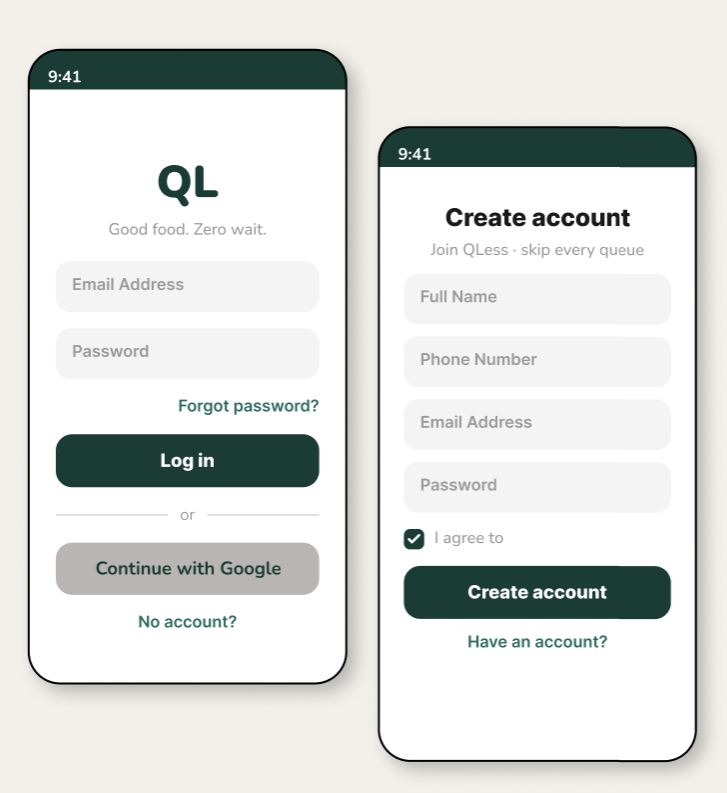
Login and Signup Screens
Core Feature
Dashboard — browse like Swiggy, order for your shop
The dashboard is the heart of QLess. A fixed header with location and search, horizontally scrolling category chips, and a vertically scrolling food list grouped by category familiar Swiggy-like patterns adapted for a single-shop context.
Horizontal category scroll keeps all categories reachable without leaving the screen
Category section headers with green dot anchors let users scan to their desired section instantly
Amber + button on each item keeps "add to cart" one tap away at all times
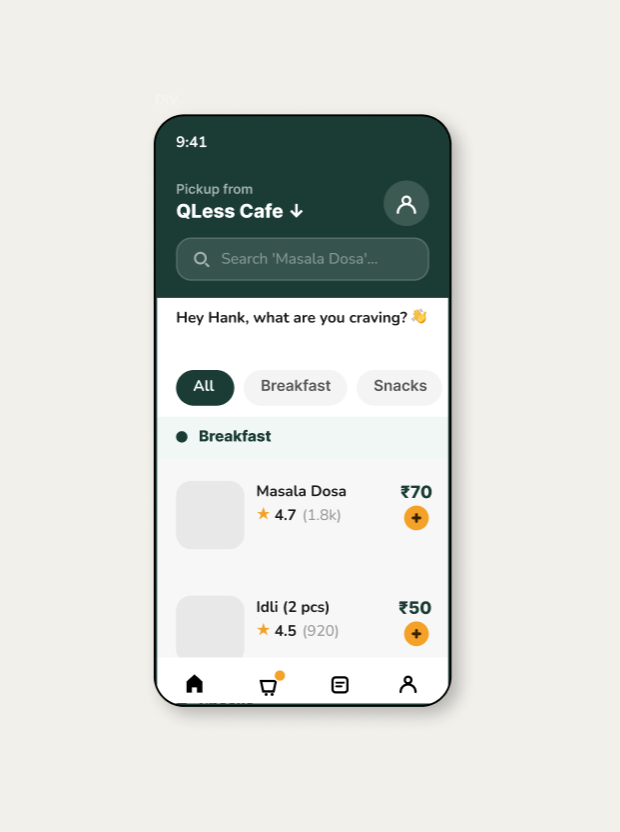
Login and Signup Screens
Core Feature
OTP pickup — confirmed in seconds
After payment, a unique 4-digit OTP is generated. The OTP screen shows the code in large, high-contrast digits with a countdown timer directly below no ambiguity about validity, no need to check email or SMS.
4-digit spoken OTP is faster than scanning a QR code works even if the screen is dimmed
Countdown timer below OTP removes anxiety user knows exactly how long the code is valid
Shop address shown below OTP one screen answers "what's the code" and "where do I go"
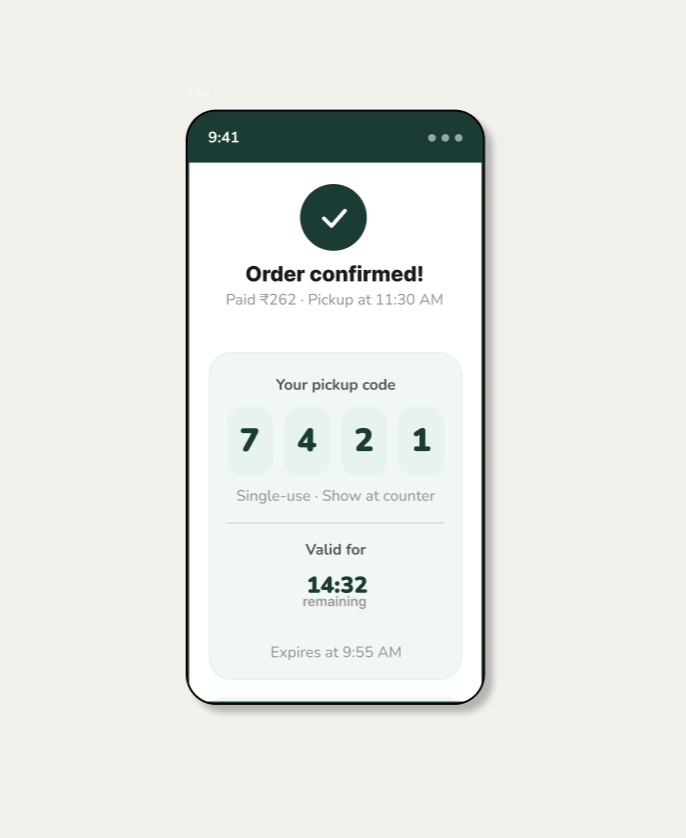
Login and Signup Screens
09 — Design System
Colours & Typography

A constrained two-tone palette deep forest green for trust and authority, warm amber for action and energy with neutral surfaces providing breathing room.

Deep Forest
#1A3C34
Forest Mid
#2E6B5E
Forest Light
#E8F2EF
Amber CTA
#F4A227
Amber Dark
#7A4A00
Surface
#F8F7F5
Display / Hero — Playfair Display 700
QLess
Playfair Display · 700 · Used for all section titles and the hero wordmark
Body / UI — DM Sans 400 & 600
Pre-order your food. Schedule a pickup time. Pay now. Walk in, say your code, walk out.
DM Sans · 400 body, 600 labels · All UI copy and case study body text
10 — Design Decisions
Why we made these choices
01
Spoken OTP over QR code
A 4-digit spoken code is faster than scanning no brightness issues, no QR app required, no awkward phone-to-counter angle. In a busy counter situation, voice confirmation is the lowest-friction exchange.
02
Prepayment as a benefit, not friction
Paying upfront was reframed as the core value proposition "your food is waiting, fully paid." This removes the cash-fumbling interaction at the counter entirely, not just speeds it up.
03
Single-shop focus, not a marketplace
Marketplace apps add delivery overhead and generic UX. A dedicated app allows deep shop integration, zero commissions, and a tailored experience that reflects the shop's own identity and menu.
04
Swiggy-style dashboard for familiarity
Users already understand horizontal category chips + vertical food lists from Swiggy. Borrowing this mental model reduced learning time to zero the interaction pattern was already in muscle memory.
05
Countdown timer below OTP
OTP validity anxiety was a usability issue discovered in testing. Users worried "has it expired?" Adding a live countdown directly below the OTP digits resolved this one glance, full confidence.
06
Time slot capacity limits by design
Limiting orders per time window is a feature, not a restriction. It ensures the kitchen never gets overwhelmed, food quality stays consistent, and the "zero wait" promise is always kept.
11 — Outcomes
Impact & results

Usability testing with 12 participants across two rounds, plus stakeholder review with the shop owner.

22s
Average time from app open to order placed against a 30-second target benchmark
96%
Task success rate for full order flow browse, add, schedule, pay, and receive OTP
4.8
Average usability rating out of 5 from 12 test participants on the Figma prototype
0
Navigation errors on the OTP screen after adding the countdown timer in round 2
100%
Of participants completed checkout without assistance after seeing the cart screen once
2 wks
Time from final designs to developer handoff with full component library in Figma
12 — Learnings
What I took away
01
Familiarity is a design asset, not laziness
Using Swiggy's dashboard pattern wasn't copying it was choosing to eliminate the learning curve entirely. When a mental model already exists in your users' heads, use it. Save the novel design energy for problems that genuinely need new patterns.
02
Anxiety appears in unexpected places
No one anticipated that OTP validity would cause stress. Testing revealed that users stared at the code wondering if it had expired. A single countdown timer resolved this entirely. You cannot predict anxiety points you can only discover them through testing.
03
Prepayment requires a trust narrative
Early prototypes showed users hesitating at the payment screen. The solution wasn't a better button it was reframing the copy. "Your food will be ready" replaced "Complete payment." The same transaction, a completely different emotional experience.
04
Constraints on the kitchen are UX features
Limiting time slot capacity felt like a product decision, not a design one. But testing showed it was crucial to the experience: users trusted the "zero wait" promise only when they understood the system guaranteed it. Surfacing constraints builds confidence.